LiveElement: The Trick That Makes TV Testing Work
You find an element on screen. You store a reference to it. You do something. Press a button, navigate, wait for a loading spinner to go away. Now you want to check that element again. Is it still there? Did the text change? Does it have focus?
In a browser, this mostly works. The DOM is persistent. Your element reference is a pointer to a real object in memory. It’s still valid after the page updates (usually). Playwright and Cypress built empires on this assumption.
On a Roku, that assumption is wrong.
The SceneGraph UI tree isn’t a persistent DOM you hold references into. It’s an XML document that you fetch over HTTP from port 8060. Every time you call GET /query/app-ui, you get a fresh snapshot. Your old snapshot is immediately stale. There’s no persistent object graph. There are no stable element IDs. There’s just “here’s what the screen looks like right now,” over and over again.
Every Roku test framework I’ve worked with handles this the same way. I’ve seen it at Hulu, Disney, Crunchyroll. Fetch the tree, find your element, do your thing, fetch the tree again, find the element again, hope it’s the same one. It’s manual, repetitive, and the source of about 80% of the boilerplate in any Roku test file.
LiveElement fixes this.
What It Is
LiveElement is a lazy, persistent reference to a UI element that re-queries the device on every method call. You create it once with a selector. Every time you ask it a question (is it displayed? is it focused? what’s the text?) it goes back to the device, fetches the current tree, runs the selector, and gives you the answer.
import { LiveElement } from '@danecodes/uncle-jesse-core';

const homeScreen = new LiveElement(tv, 'HomeScreen');
That’s it. homeScreen now represents the HomeScreen node on the device. But it doesn’t hold a snapshot. It doesn’t cache anything. It’s a query that re-executes on demand.
// Each of these hits the device fresh
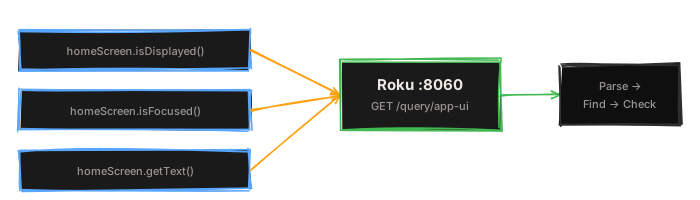
await homeScreen.isDisplayed();    // queries tree, finds HomeScreen, checks visible attr
await homeScreen.isFocused();      // queries tree again, checks focused attr
await homeScreen.getText();        // queries tree again, returns text attr
Three method calls, three HTTP requests, three fresh snapshots. No stale data. No “element not found because the screen changed 200ms ago.”
The Cost
“It re-queries every time” sounds like a performance problem. It’s not. It’s the design.
The Roku ECP response time for GET /query/app-ui is typically 30–80ms on a modern device. That’s fast enough that you don’t notice the cost, and it buys you the only thing that matters: your tests never lie about what’s on screen.
Compare this to what every other Roku testing approach does:
// The old way: fetch once, hold a stale reference
const tree = parseUiXml(await roku.queryAppUi());
const button = findElement(tree, 'AppButton#play');

// ... press some keys, wait for navigation ...

// button is now pointing at a snapshot from before the navigation
// is it still valid? who knows! fetch the tree again manually
const newTree = parseUiXml(await roku.queryAppUi());
const buttonAgain = findElement(newTree, 'AppButton#play');
// hope it's the same element and not a different AppButton#play
// from a different screen that also happens to exist
That’s not testing. That’s archaeology. You’re digging through snapshots hoping the element you found is the one you think it is.
With LiveElement:
const button = tv.$('AppButton#play');

// ... press some keys, wait for navigation ...

// button re-queries automatically
await button.toBeDisplayed();  // fresh check, current screen
await button.toBeFocused();    // fresh check, current screen
Same reference. Always current. You never think about tree freshness again.
Chaining: Scoped Queries
LiveElement supports chaining. When you call $() on a LiveElement, the child query is scoped to the parent’s subtree:
const home = new LiveElement(tv, 'HomeScreen');
const grid = home.$('RowList');
const title = home.$('Label#screenTitle');
grid doesn’t just find any RowList on the screen. It finds a RowList that’s a descendant of HomeScreen. When you call await grid.isDisplayed(), the device is queried, HomeScreen is found first, then RowList is searched within its children. Both lookups happen fresh, every time.
This means your selectors stay unambiguous even when multiple screens share component names. A Label#title inside HomeScreen and a Label#title inside SettingsScreen are different elements, and scoped queries keep them separate without you writing increasingly specific selectors.
Actions: Not Just Read-Only
LiveElement isn’t just for reading state. It can act on the element it represents:
const settingsBtn = home.$('NavTab#settings');

// Navigate to it and select it
await settingsBtn.focus();     // uses element bounds to D-pad navigate
await settingsBtn.select();    // focuses then presses Select

// Scroll until visible, then select
await settingsBtn.select({ ifNotDisplayedNavigate: 'down' });

// Clear a text field
const searchInput = tv.$('TextInput#search');
await searchInput.clear();     // backspace for each character
focus() is the interesting one here. On a TV, you can’t click an element. You have to navigate to it with the D-pad. LiveElement reads the element’s bounds from the SceneGraph, figures out which direction to press, and navigates there. It re-queries after each key press to verify it’s making progress. If focus doesn’t land where expected, it adjusts.
This is the kind of thing that takes 40 lines of imperative code in a traditional Roku test. With LiveElement it’s one method call.
Assertions That Poll
Every assertion on LiveElement polls automatically. This is the other half of what makes it work for TV testing.
await homeScreen.toBeDisplayed({ timeout: 10000 });
await title.toHaveText('Home');
await title.toHaveAttribute('color', '0xffffffff');
await title.toHaveAttribute('text', /Episode \d+/);
await grid.toBeFocused({ timeout: 5000 });
await spinner.toNotBeDisplayed({ timeout: 15000 });
toBeDisplayed({ timeout: 10000 }) doesn’t check once and fail. It polls the device every 200ms for up to 10 seconds, re-querying the tree and re-running the selector each time. When the element appears and its visible attribute isn’t "false", the assertion passes.
This eliminates the most common pattern in TV test code:
// What you used to write
let found = false;
for (let i = 0; i < 50; i++) {
  const tree = parseUiXml(await roku.queryAppUi());
  const el = findElement(tree, 'HomeScreen');
  if (el && el.attrs.visible !== 'false') {
    found = true;
    break;
  }
  await sleep(200);
}
expect(found).toBe(true);
vs.
// What you write now
await homeScreen.toBeDisplayed({ timeout: 10000 });
Same behavior. One line. And the assertion gives you a useful error message when it fails, not just “expected true to be true.”
Staleness Detection
Sometimes you need to know if an element changed between two points in time. LiveElement tracks this:
const title = home.$('Label#screenTitle');

// First query establishes a baseline
await title.getText();  // "Home"

// ... navigate somewhere ...

// Did the element change?
const stale = await title.isStale();  // true if attributes differ from first query
This is useful for detecting that a navigation actually happened. If the title’s text is different from what it was before you pressed keys, the screen changed. Combine this with waitForStable() and you can write navigation assertions that don’t depend on timing.
Element Collections
$$ returns an ElementCollection. It’s the multi-element version of LiveElement. Same lazy re-query behavior, but for lists.
const rows = home.$$('RowListItem');
const count = await rows.length;     // queries device, counts matches
const first = rows.get(0);           // returns a LiveElement for the first match

// Assertions
await rows.toHaveLength(3);
await rows.toHaveText(['Featured', 'Recently Added', 'Popular']);

// Iteration
const titles = await rows.map(async (el) => el.getText());
const visible = await rows.filter(async (el) => el.isDisplayed());
Each call to rows.length or rows.get(0) goes back to the device. If a row gets added or removed between calls, you see the current state, not a stale snapshot.
Why Not Just Cache?
Reasonable question. If ECP queries are fast (30–80ms), why not cache the tree and invalidate on key presses?
Because you can’t reliably invalidate. The Roku app is a black box. Animations finish at unpredictable times. Network responses arrive and update the UI asynchronously. Background tasks modify the tree without any input from your test. Timers fire. Content loads.
Any caching strategy requires knowing when the tree changed, and you don’t. The only reliable source of truth is the device itself, queried at the moment you need the answer.
LiveElement’s “always fresh” approach is more network requests, yes. But it’s zero stale-data bugs. Zero cache invalidation edge cases. Zero “the test passed locally but failed in CI because the timing was different.” The trade-off is correct every time.
The Foundation
LiveElement is the primitive that everything else in Uncle Jesse is built on. Page objects use it. focusPath uses it. Element assertions use it. The entire framework’s reliability comes from this one decision: never trust a snapshot, always go back to the device.
It sounds simple because it is. The hard part was committing to it as a design principle instead of optimizing it away.
Full docs at dane.codes/uncle-jesse/docs. Source at github.com/danecodes/uncle-jesse.