roku-ecp: The Library Roku Should Have Built
Every Roku device ships with a hidden superpower that almost nobody uses correctly: the External Control Protocol. It’s an HTTP API sitting on port 8060 that lets you do basically anything. Press buttons, launch apps, query device state, inspect the entire SceneGraph UI tree. It’s been there for years. It’s documented. It works.
And somehow, in the year of our lord 2026, the official tooling for interacting with it is still “write your own curl commands and parse XML with your eyes.”
So I built roku-ecp.
What ECP Actually Is
For the uninitiated: ECP is Roku’s way of letting external programs talk to the device over HTTP. Your Roku is a tiny web server. You send it requests, it does things. It’s beautifully simple and criminally underutilized.
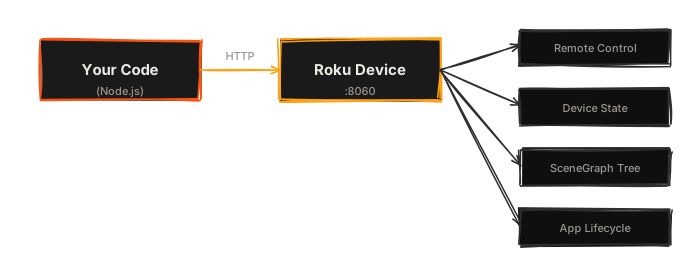
The problem is that “simple HTTP API” still means hand-managing URLs, parsing XML responses, remembering which key name is Lit_ prefixed and which isn’t, and generally doing a bunch of tedious plumbing every single time you want to automate something on a Roku.
It’s 2026. We shouldn’t be concatenating URL strings like it’s a CGI script.
The Old Way
Here’s what talking to a Roku looked like before. And I mean every single time. Every project. Every script. Every “I just need to do one quick thing.”
You ever type curl -d '' http://192.168.0.30:8060/keypress/Down fourteen times in a row? I have. I’ve done it more times than I’ve called my mother. That’s not engineering. That’s a cry for help.
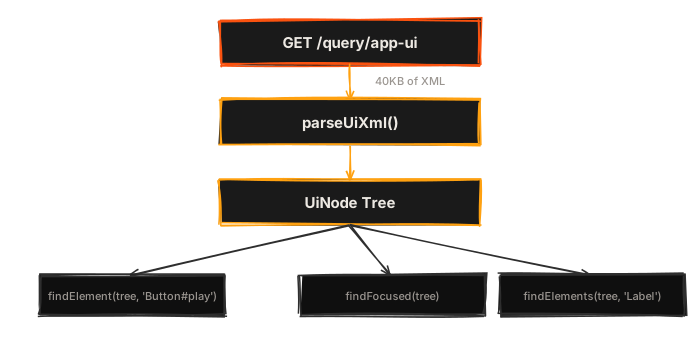
And god forbid you need to inspect the UI tree. That’s a GET /query/app-ui that returns like 40KB of raw XML. Hope you like angle brackets.
The New Way
That’s it. One dependency. Zero native modules. No Java runtime lurking in the shadows waiting to consume 2GB of RAM for the privilege of pressing a button on a TV.
Here’s what the same workflow looks like now:
import { EcpClient, Key } from '@danecodes/roku-ecp';

const roku = await EcpClient.discover();

await roku.press(Key.Down, { times: 3 });
await roku.press(Key.Select);

const app = await roku.queryActiveApp();
console.log(app.name, app.version);
Five lines. Typed. Discoverable. No URL concatenation. No XML parsing. No wondering if the key is called Select or select or OK or whatever the hell Roku decided that day.
Auto-Discovery
You don’t need to know your Roku’s IP address. roku-ecp uses SSDP (the same protocol your Roku uses to show up in the Roku app) to find devices on your network:
Or if you’re fancy and have multiple Rokus (no judgment):
const devices = await EcpClient.discoverAll();
// => [ EcpClient(192.168.0.30), EcpClient(192.168.0.42) ]
CSS-Like Selectors for SceneGraph
This is where it stops being a nice wrapper around curl.
Roku’s SceneGraph UI tree is XML. Big, nested, deeply annoying XML. roku-ecp parses it into a traversable tree and gives you CSS-like selectors to query it:
import { parseUiXml, findElement, findFocused } from '@danecodes/roku-ecp';

const tree = parseUiXml(await roku.queryAppUi());

// Find by component type and name
const btn = findElement(tree, 'AppButton#play_button');

// Descendant selector
const hero = findElement(tree, 'HomePage HomeHeroCarousel');

// Direct child
const label = findElement(tree, 'LayoutGroup > AppLabel');

// Attribute selectors
const focused = findElement(tree, '[focused="true"]');
const episodes = findElement(tree, '[text^="Episode"]');
const images = findElement(tree, '[uri$=".png"]');

// Pseudo-classes
const playBtn = findElement(tree, 'AppButton:has(AppLabel[text="Play"])');
const unfocused = findElement(tree, 'NavTab:not([focused="true"])');
const first = findElement(tree, 'RowItem:first-child');
If you’ve ever written a web test with CSS selectors, you already know how to navigate a Roku UI tree. That was the whole point. The Roku ecosystem has been stuck in “parse XML with regex” mode for years, and I wanted something that felt like the tools web developers have had since 2005.
The Full Picture
Here’s what roku-ecp actually covers:
| Feature | What it does |
|---|---|
| Remote input | Keypress, keydown/up, repeated press with delay, character-by-character typing, touch coordinates |
| Device queries | Device info, active app, installed apps, media player state |
| App lifecycle | Launch, install, deep link, send input params, close |
| UI inspection | Parse SceneGraph XML, CSS selectors with :has(), :not(), attribute matching, find focused element |
| Wait helpers | waitForElement, waitForFocus, waitForApp, waitForText, waitForStable. Poll with configurable timeout |
| Sideloading | Deploy .zip files or directories to dev channel over digest auth |
| Screenshots | Capture device screen as PNG buffer |
| Debug console | Read BrightScript console output, send commands, parse for errors/crashes |
| Log parsing | Structured log parsing via roku-log. LogParser, LogStream, LogSession for real-time streaming and aggregation |
| Typed errors | EcpTimeoutError, EcpHttpError, EcpAuthError. Clean catch handling for every failure mode |
| Discovery | SSDP auto-discovery of Roku devices on the network |
All of that. One package. @danecodes/roku-ecp. No transitive dependency hell. No native binaries. No “please install Java 11 and also Maven and also cry.”
Why This Matters
Look, I’ve been building Roku apps for a long time. The platform is powerful and the hardware is everywhere. There are literally more Roku devices in the US than people in Canada. But the developer tooling has always been… let’s say “character building.”
Every Roku team I’ve worked on (Hulu, Crunchyroll, everywhere) has had some version of these scripts lying around. Little Node scripts. Bash one-liners. Someone’s Python thing that kind of works but only on their machine. Everyone is reinventing the same wheel, and the wheel is always a little wobbly.
roku-ecp is my attempt to build the wheel once, properly, so nobody has to think about port 8060 ever again.
What’s Next
This library is the foundation. Next post, I’ll write about roku-mcp, an MCP server that sits on top of roku-ecp and lets AI agents like Claude directly control your Roku. Inspect the UI, navigate menus, take screenshots, debug crashes. All through natural language tool calls.
Because if I’m going to automate my TV, I’m going to really automate my TV.