roku-mcp: Teaching AI Agents to Use a Television
In the last post, I wrote about roku-ecp, a TypeScript client that wraps Roku’s External Control Protocol into something a human can actually use. That library solved the “why am I writing curl commands in 2026” problem.
This post is about what happens when you hand those capabilities to an AI agent and say “here, you figure it out.”
roku-mcp is an MCP server that sits on top of roku-ecp and exposes every Roku interaction as a tool that AI agents can call. Claude Code, Cursor, Copilot, Codex. Anything that speaks Model Context Protocol can now see your TV screen, press buttons, launch apps, read the debug console, and run smoke tests.
It’s actually good at it.
The Setup
Five minutes. I’m not exaggerating.
Then drop this in your .mcp.json:
{
  "mcpServers": {
    "roku": {
      "type": "stdio",
      "command": "npx",
      "args": ["-y", "--package", "@danecodes/roku-mcp", "roku-mcp-server"],
      "env": {
        "ROKU_DEVICE_IP": "192.168.0.30"
      }
    }
  }
}
That’s it. Your AI agent now has 20+ tools for controlling a Roku device. The Roku is a peripheral now.
What the Agent Can See
The agent isn’t blindly mashing buttons. It can read the SceneGraph UI tree, the actual component hierarchy that makes up what’s on screen. It knows what’s focused. It knows what text is displayed. It can find elements by CSS-like selectors.
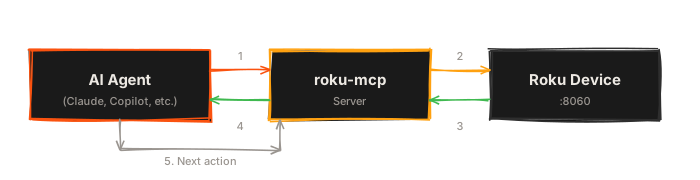
The loop is: agent reads the screen, decides what to do, does it, reads the screen again. Sound familiar? That’s how a person uses a TV. Except the agent is faster and doesn’t get distracted by whatever’s autoplaying on the home screen.
The Secret Ingredient: App Knowledge
The AI doesn’t need to be brilliant. It needs to be informed.
If you tell Claude “navigate to the search screen on my streaming app,” it has no idea what that means structurally. The app could have any layout. The nav could be on the left, the top, behind a hamburger menu, or accessible only by pressing Back three times and then Right.
But if you give the agent a little context, even just a few sentences, everything changes. As of v0.3.2, roku-mcp has a built-in way to do this: drop a roku-app.md file in your project root.
## App Navigation

The app uses a left-side nav menu. Press Left from any content screen
to open it. Menu items from top to bottom: Home, Browse, Library,
My Lists, Settings. The Browse screen has genre rows. Select a genre
to see the content grid.
Search is accessible from the top of the nav menu.
That’s it. The MCP server reads it at startup and feeds it to every connected agent automatically. No config needed. If the file exists, it’s used. You can also set ROKU_APP_CONTEXT in your env to point at a different path.
That paragraph, plus the ability to read the UI tree, is enough for an AI agent to navigate an entire streaming application. It doesn’t need a complete map. It needs the same rough mental model that a QA tester builds in their first hour with the app.
Claude Code users: you can also just put this in your CLAUDE.md and it works the same way. The agent picks it up as project context. The roku-app.md approach is nice because it’s tool-agnostic and travels with the MCP server, but use whichever fits your workflow.
Actual Conversations I’ve Had With My TV
This is a real workflow. Not a demo. Not a mockup. This is what it actually looks like when you point Claude at a Roku.
The agent figured out the navigation. It used the search. It found the latest episode by reading the UI. It confirmed playback started. I typed one sentence.
Smoke Testing a Dev Build
Not “cool demo” practical. “My engineering manager wants to see this” practical.
Sideload a zip, watch the console for BrightScript errors, deep link to a specific piece of content, verify the UI renders, verify playback starts, report pass/fail. That’s a real CI-quality smoke test, driven entirely by an AI agent, in about 45 seconds.
Every Roku team I’ve ever been on has wanted this. The test infrastructure to do it traditionally would be Selenium Grid or Appium. Java dependencies, flaky WebDriver connections, a dedicated test device farm. This is a single npm package and an HTTP connection to port 8060.
The Full Toolkit
The MCP server exposes these tools to the agent:
| Category | Tools | What they do |
|---|---|---|
| Vision | roku_ui_tree, roku_find_element, roku_focused_element, roku_screen_name, roku_screenshot | Read the screen, find elements, take screenshots |
| Control | roku_press_key, roku_type_text, roku_launch, roku_deep_link, roku_close_app, roku_volume | Navigate, type, launch apps, control playback |
| State | roku_device_info, roku_active_app, roku_media_player, roku_installed_apps | Query what the device is doing |
| Debug | roku_console_log, roku_console_command, roku_console_watch | Read BrightScript console, send debug commands |
| Testing | roku_wait_for, roku_assert_element, roku_sideload_and_watch, roku_smoke_test, roku_cert_preflight, roku_chanperf_sample | Full shift-left QA pipeline |
That last row is important. roku_cert_preflight runs through the Roku certification checklist: back navigation, Home key exit, relaunch behavior, error scanning. The stuff that gets your channel rejected from the Roku store. An AI agent can now run your cert checklist for you.
Why This Actually Matters
I’ve been building Roku apps for a decade. The platform testing story has always been: you put a device on your desk, you press buttons manually, you squint at the BrightScript console, and you hope you catch the crash before the cert team does.
The tools to automate this have always existed in theory. ECP has been there the whole time. But the gap between “there’s an HTTP API” and “I can have a conversation with my TV” was too wide for most teams to bridge. You’d need custom scripting, XML parsing, state management, error handling, and the patience of a person who enjoys writing infrastructure that nobody will ever thank you for.
roku-mcp closes that gap. Give it a device IP, give the agent some basic app knowledge, and you’ve got a QA automation system that can navigate your app, verify behavior, catch crashes, and report results. All through natural language.
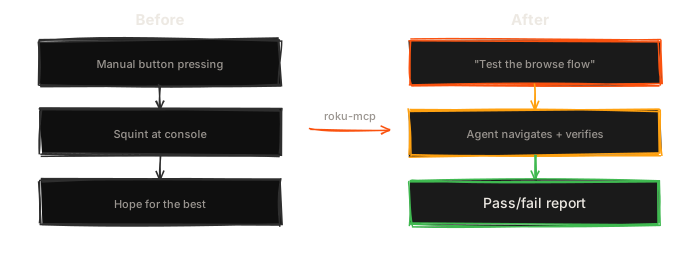
Is it going to replace a full QA team? No. Don’t be weird about it. But it’s going to catch the dumb stuff faster, it’s going to run the repetitive checks without complaining, and it’s going to do it at 2 AM when you push a build and nobody’s awake to manually verify it.
Get It
npm install -g @danecodes/roku-mcpWorks with Claude Code, Cursor, Copilot, Codex, or anything else that speaks MCP. Repo is at github.com/danecodes/roku-mcp.
Your TV’s been listening on port 8060 this whole time. Might as well say something.