Uncle Jesse: E2E Testing for TVs That Doesn't Suck
It’s 4 PM. You’re trying to verify a navigation fix before the cert submission deadline. Your Appium server crashes for the third time. The WebDriver session expired again. Someone on the team asks “did you try restarting Java?” and you seriously consider a career change. You’re using a framework designed for mobile phones to test a TV, routed through a protocol designed for web browsers, connected to a device that speaks none of these languages.
This is the state of the art. In 2026. For a platform with more devices in the US than there are people in Canada.
I got tired of it. So I built Uncle Jesse.
What It Is
Uncle Jesse is an E2E testing framework for smart TVs. TypeScript, off-device, over HTTP. It talks directly to the Roku via ECP on port 8060, the same protocol every Roku has shipped with for years. No Appium server. No Selenium Grid. No WebDriver. No Java runtime eating 2GB of RAM so it can relay your button presses through three layers of abstraction.
That’s it. npm install, write tests, run them. Your tests live in Node. The Roku lives on your network. They talk over HTTP. Everything in between is gone.
Why It Feels Like Playwright
I didn’t want to invent a new testing API. Web developers have had good E2E tools for years. Playwright, Cypress, WebdriverIO. The patterns are proven. So Uncle Jesse steals liberally from all of them.
CSS-like selectors on the SceneGraph tree:
const grid = await tv.$('HomeScreen RowList');
const title = await tv.$('Label#screenTitle');
const focused = await tv.$('[focused="true"]');
const navItem = await tv.$('NavBar > NavTab#tabHome');
If you’ve ever written document.querySelector, you know how to find elements on a Roku screen. That was the whole point.
LiveElement: The Thing That Makes It Actually Useful
LiveElement is a persistent reference to a UI element that re-queries the device every time you call a method on it. It doesn’t cache stale state. It doesn’t hold a reference that goes dead when the screen changes. It goes back to the device and checks.
const homeScreen = new LiveElement(tv, 'HomeScreen');

// These all hit the device fresh
await homeScreen.isDisplayed();
await homeScreen.isFocused();
await homeScreen.toBeDisplayed({ timeout: 10000 });

// Chain into child elements
const grid = homeScreen.$('RowList');
const title = homeScreen.$('Label#screenTitle');
await title.toHaveText('Home');
The assertions poll automatically. toBeDisplayed({ timeout: 10000 }) doesn’t check once and fail. It polls every 200ms for up to 10 seconds. No waitUntil wrappers. No browser.pause(2000) and hoping for the best. No “sleep 3 seconds and pray the animation finished.”
Every Roku test suite I’ve worked on has had some version of the sleep-and-pray pattern. It’s the leading cause of flaky TV tests, and it’s been normalized because the tooling never offered anything better.
focusPath: Testing D-Pad Navigation Without Losing Your Mind
D-pad navigation testing is the worst part of Roku QA. You press Right, check where focus went. Press Right again. Check again. Press Down. Check. It’s tedious, it’s fragile, and when it breaks you get zero useful information about which step failed.
focusPath fixes all of that:
const result = await focusPath(tv)
  .press('right').expectFocus('[title="featured-item-2"]')
  .press('right').expectFocus('[title="featured-item-3"]')
  .press('down').expectFocus('[title="recent-item-1"]')
  .press('down').expectFocus('[title="recent-item-2"]')
  .verify();

expect(result.passed).toBe(true);
It’s chainable. It runs every step and collects all failures instead of stopping at the first one. Each step waits for focus to stabilize (two consecutive tree queries have to agree) before checking the assertion. No timing hacks.
And when something fails:
You know exactly which steps broke and what actually had focus. Not “test failed somewhere in the navigation flow, good luck.”
Visual Replay
Pass { record: true } and focusPath captures a screenshot and UI tree snapshot at every step. The output is a self-contained HTML file with a scrubber. You can step through the entire navigation sequence visually, seeing exactly what the screen looked like at each point.
const result = await focusPath(tv, { record: true, testName: 'browse-nav' })
  .press('right').expectFocus('[title="Action"]')
  .press('down').expectFocus('[title="Comedy"]')
  .verify();

await saveReplay(result.replay, './test-results');
Give that HTML file to your QA lead. Send it to your PM. Attach it to the cert submission. It’s a visual record of “yes, navigation works, here’s proof, stop asking me.”
Page Objects: Migration-Ready
If you’re coming from Appium/WebdriverIO (and let’s be honest, if you have Roku E2E tests, there’s a good chance you are) Uncle Jesse’s page objects are designed to be a near drop-in replacement.
class HomePage extends BasePage {
  get root() { return this.$('HomeScreen'); }
  get navBar() { return new NavBar(this.$('NavBar')); }
  get grid() { return this.$('HomeScreen RowList'); }

  async waitForLoaded() {
    await this.root.toBeDisplayed();
    await this.grid.toExist();
  }
}

class NavBar extends BaseComponent {
  get homeTab() { return this.$('NavTab#tabHome'); }
  get searchTab() { return this.$('NavTab#tabSearch'); }
  async selectSearch() { await this.searchTab.select(); }
}
Same pattern. Same structure. But now your selectors are CSS-like instead of XPath, your assertions poll automatically, and you don’t need Java running to make any of it work.
There’s a full migration guide if you want the side-by-side comparison.
The Stack
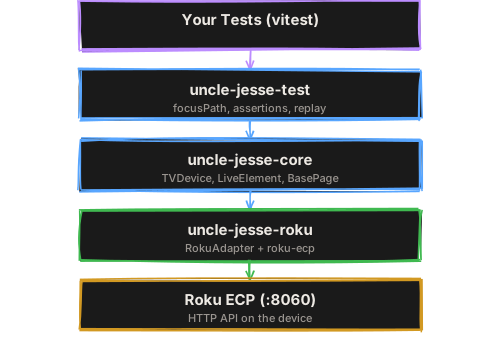
Everything flows down through clean layers. The core is platform-agnostic. TVDevice and LiveElement don’t know about Roku. The Roku adapter wraps roku-ecp and handles the Roku-specific translation. When other TV platforms get adapter support, your tests don’t change.
The Stuff Nobody Else Has
A few things that I haven’t seen in any other Roku testing tool:
- Multi-device parallel testing.
DevicePoolmanages a pool of Roku devices. Tests acquire a device, run, and release it. Run your full suite across 3 devices in parallel instead of serial on one. - Log capture. Stream BrightScript console output during tests via roku-log. Catch errors, crashes, and backtraces as structured data. Know why a test failed, not just that it did.
- Registry state injection. Skip onboarding flows, set language preferences, configure any app state before launch. No more “test failed because the FTUE modal was showing.”
- CTRF reporting. Generate Common Test Reporting Format output for CI dashboards and cross-team analytics.
- Mock server integration. Deterministic test data with scenario management and API call verification.
Who This Is For
If you’re on a Roku team and you’re doing any of the following:
- Manually pressing buttons on a device to verify builds
- Running Appium with Java and hating every minute of it
- Writing bash scripts that curl port 8060 and parse XML with grep
- Not testing at all because the infrastructure seemed too hard
Uncle Jesse is for you. It’s the framework I wanted at every Roku job I’ve ever had.
Full docs at dane.codes/uncle-jesse. Migration guide at dane.codes/uncle-jesse/migration. Source at github.com/danecodes/uncle-jesse.
Stop pressing buttons manually. It’s 2026 for fuck’s sake.